Airport WiFi is convenient and often free, but it’s also a prime spot for snoops, fake networks, and unencrypted traffic that can expose passwords, personal data, and work files. Travelers who connect without checking the network or protecting their device can face anything from account takeovers to corporate data leaks—problems that are easy to avoid with a few simple habits.
This guide shows how to find and use safe airport wifi without slowing down your trip: quick verification checks, a straightforward secure-connect workflow you can follow between flights, and practical options when the airport network isn’t trustworthy. It’s written for business travelers, families, and digital nomads who need fast, secure access while on the move.
Quick Answer
Short and practical: treat public airport networks as untrusted. Only join the airport’s confirmed SSID, disable automatic connections, use a reputable VPN before doing anything sensitive, and prefer your phone’s cellular data or a personal hotspot when possible to stay on the safe side.
- Verify the SSID with airport signage or staff, avoid generic/open networks, and don’t install unknown apps or accept strange captive-portal prompts.
- Turn off automatic WiFi joins, enable a trusted VPN and HTTPS-only browsing, and avoid banking or work logins unless the connection is secured.
- When available, use a personal hotspot or local data SIM; forget the airport network afterward and change exposed credentials if you suspect a compromise.
Why This Happens
Airports are hubs for thousands of transient users and dozens of different network operators, so the security gaps you see aren’t just accidental—they’re the result of infrastructure choices, business priorities, and common device behaviors. Those combined forces make it difficult to provide truly private, hardened connectivity for every traveler.
- Scale and convenience first: networks are built to get large numbers of people online quickly—open SSIDs and simple captive portals prioritize access over cryptographic protection, which makes traffic easier to intercept or mimic.
- Legacy gear and slow patch cycles: airport WiFi hardware is often deployed for performance and coverage, not frequent security updates, and many vendor ecosystems are fragmented across terminals and contractors.
- Commercial incentives: airports monetize connectivity (ads, sponsorships, analytics) and focus on uptime and user experience; adding stricter controls can be costly, complex, and unpopular with users.
- Complex operations and third-party providers: multiple vendors, roaming hubs, and partner portals create inconsistent configurations and more potential weak links in authentication and encryption chains.
- Device and app defaults: phones and laptops often auto-join networks, run background syncs, and keep services active—behavior that increases accidental data exposure even when users aren’t actively browsing.
- High-value, low-effort targets: travelers frequently use corporate accounts, banking apps, and travel credentials, so attackers get outsized rewards for relatively simple spoofing or eavesdropping techniques.
- Captive-portal ecosystems: those login/advert pages introduce redirects, scripts, and optional app installs that expand the attack surface and can be abused or faked.
- Diversity of client devices: a mix of up-to-date devices and older smartphones, tablets, and IoT gadgets creates many potential entry points that are hard for airport operators to control.
Put together, these operational, technical, and human factors explain why reliably finding safe airport wifi is challenging and why awareness is the first line of defense.
Practical Solutions
Concrete, repeatable fixes you can apply right now or pack for your next trip. These combine free habits with simple hardware and software choices so you can stay online without handing attackers easy access.
-
Build a travel device profile
Create a separate user account or browser profile used only for travel. Keep the profile lean: no saved Wi‑Fi networks, few installed apps, and only the credentials you absolutely need. When you return, delete the profile or wipe sensitive caches.
-
Preload secure offline backups
Export and encrypt essentials ahead of departure: passport scan, boarding passes, emergency contacts, and one‑time 2FA backup codes. Store them in an encrypted container or password manager that supports offline access so you don’t need to risk public networks for recovery tasks.
-
Use a hardened, ephemeral browsing setup
When you must use public Wi‑Fi, open a fresh browser profile or private window with tracker blockers and automatic cookie clear on close. Avoid installed extensions that request broad permissions; prefer lightweight privacy extensions and enable the browser’s HTTPS‑only mode.
-
Prefer cellular or a personal hotspot for sensitive work
If you have a choice, use mobile data or a dedicated portable hotspot for banking and corporate logins. Cellular connections are harder to spoof than open Wi‑Fi. If you rely on a hotspot, create a strong passphrase and a non‑identifying SSID.
-
Carry a minimal “burner” device or SIM strategy
For frequent travelers doing high‑risk work (sensitive deals, privileged info), keep a secondary device with only the apps and accounts needed for that trip, or use a local prepaid SIM for data. That reduces exposure if your main device is targeted.
-
Pack a small security kit
Bring compact hardware that mitigates common airport threats: a portable power bank (airline‑compliant), a USB data blocker for public charging stations, and a privacy screen for shoulder‑surfing prevention. These are low‑cost, high‑impact items you can use constantly.
-
Automate protective settings where possible
Create device shortcuts or automation scripts that toggle flight mode, disable Wi‑Fi auto‑join, enable the firewall, and launch your VPN client. A single tap should put your device into a safe state before you connect.
-
Use layered authentication and short‑lived credentials
Favor methods that limit damage if intercepted: time‑based OTPs, hardware tokens, or short‑lived app session tokens. For one‑off access, use temporary accounts or single‑use links rather than your main credentials.
-
Establish a simple secure‑connect workflow
Have a fixed routine: check network legitimacy (ask staff or signage), connect only through your locked‑down profile, enable your VPN, then perform non‑sensitive tasks first and defer banking or admin until you’re on cellular or a verified connection.
-
Keep recovery and incident steps ready
Store emergency procedures: numbers to freeze cards, how to revoke sessions from your account settings, and the ability to quickly change passwords from a trusted device. Having these steps saved and practiced reduces panic if something goes wrong.
Recommended Products
These essentials cover the core risks of using airport WiFi: encrypting traffic, avoiding spoofed networks, and keeping devices powered and private. Pick a trusted VPN and one or two hardware options (mobile hotspot, travel router, or local SIM) to give yourself reliable, secure connectivity on the go.
ExpressVPN subscription (mobile & desktop)
Brand: ExpressVPN
ExpressVPN is a top-rated, travel-friendly VPN with fast speeds, a large global server network, strong AES-256 encryption, and audited no-logs policies. It offers easy-to-use apps for iOS, Android, Windows, macOS, and Linux, reliable performance on public Wi‑Fi, split tunneling and a kill switch, and 24/7 live chat support—making it ideal for travelers needing secure, consistent access to streaming and region-restricted services.
NETGEAR Nighthawk M5 5G Mobile Hotspot (MR5200)

Brand: NETGEAR
Reliable 5G portable hotspot from a trusted networking brand — supports Wi‑Fi 6 for faster connections, works with local SIMs for international travel, powers up to ~32 devices, includes Ethernet and USB‑C connectivity, and offers all‑day battery life (around 13 hours) — ideal for frequent travelers who need fast, secure internet on the go.
Orange Holiday Europe Prepaid SIM Card (20GB, 14 days)
Brand: Orange
Trusted European carrier offering wide coverage across dozens of countries, a generous 20GB data allowance for short trips, simple prepaid activation, includes minutes/SMS, and works in unlocked phones—making it reliable and convenient for travelers.
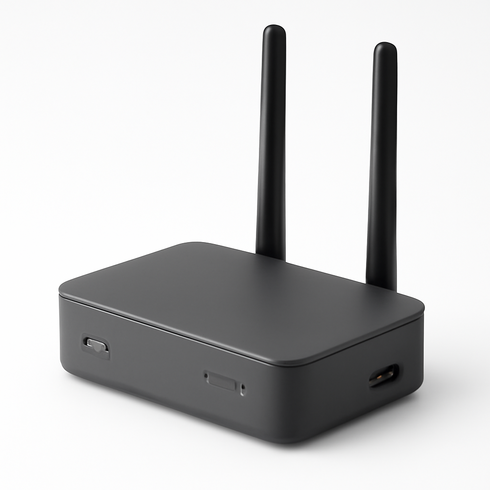
GL.iNet GL-AX1800 (Flint) Travel Router
Brand: GL.iNet
Compact, travel-friendly Wi‑Fi 6 router that explicitly supports WPA3 encryption and configurable SSID security via its OpenWrt-based firmware. Offers gigabit ports, USB-C power, built-in VPN client, guest network and advanced privacy settings—making it easy to create a secure SSID and protect devices on hotel or public networks while traveling.
Comparison Table
| Product Type | Best Use | Main Advantage | Downside | Who Should Choose It |
|---|---|---|---|---|
| ExpressVPN subscription (mobile & desktop) | Encrypt all device traffic on public networks—use before any sensitive activity | Strong encryption across WiFi and cellular; protects data from eavesdroppers | Recurring cost, potential speed impact, requires trust in provider | Frequent flyers, remote workers, anyone logging into sensitive accounts |
| NETGEAR Nighthawk M5 5G Mobile Hotspot (MR5200) | Create a private WiFi network using cellular data for multiple devices | Reduces reliance on airport networks; usually faster and more reliable than open WiFi | Another device to carry and charge; roaming/data costs can add up | Families, groups, travelers needing several connected devices |
| Orange Holiday Europe Prepaid SIM Card (20GB, 14 days) | Get local data access without using hotel/airport WiFi | Cellular security and often cheaper local data rates than roaming | Requires unlocked phone or separate device; coverage varies by country | Long-term travelers, digital nomads, those staying in one country |
| GL.iNet GL-AX1800 (Flint) Travel Router | Turn shared wired or hotel WiFi into a small, secure personal network | Creates a centralized, WPA3-protected SSID and device-level controls | Setup complexity and some venues block personal routers | Privacy-focused users, multi-device travelers, extended stays |
FAQ
Is airport WiFi safe to use?
Not always — many airport networks are unencrypted or can be spoofed. Verify the network, avoid sensitive tasks until you have a secure connection, and use a VPN for added protection.
How can I tell if an airport WiFi is legitimate?
Confirm the SSID with airport signage or staff, avoid vague or generic network names, and make sure the captive portal and login pages match the airport’s branding before entering credentials.
Do I need a VPN on airport WiFi?
Yes. A reputable VPN encrypts your traffic and prevents eavesdropping on public networks — essential when using any untrusted WiFi.
Are free VPNs safe for travel?
Many free VPNs log user data, inject ads, or sell bandwidth. Prefer paid, no-logs providers with strong encryption and a clear privacy policy.
Is using my phone as a hotspot safer than airport WiFi?
Generally yes. Cellular connections are harder to intercept than open WiFi. Use your phone’s hotspot or a local data SIM when possible for more secure internet access.
Can I do online banking on airport WiFi?
Avoid banking on public WiFi unless you’ve verified the network and are connected through a trusted VPN; otherwise use mobile data for financial transactions.
What quick settings should I change before joining public WiFi?
Disable automatic WiFi connections, turn off file and printer sharing, enable your device firewall, and ensure your OS and apps are up to date before connecting.
How do I avoid fake „Free Airport WiFi“ networks?
Ask airport staff for the exact network name, skip networks with generic names like „Free_WiFi,“ and never accept unexpected prompts, app installs, or credential requests.
Conclusion
When you need safe airport wifi, make one simple commitment before your next trip: don’t treat public connections as private. Pick a single primary protection—use your phone’s cellular hotspot or enable a reputable VPN on all devices—install and test it at home, then make it your default when traveling. That one habit will block the majority of risks and keep your travel browsing fast and secure.